Sidebar
This is an old revision of the document!
Cloud Zoo License Usage
For questions about the CloudZoo license system and https://www.rhino3d.com/docs/guides/accounts/#teams, please see this https://www.rhino3d.com/docs/guides/accounts/.
Setup Your Team
Go to your Rhino account. Set up a Team, invite users and add your licenses to the Team.
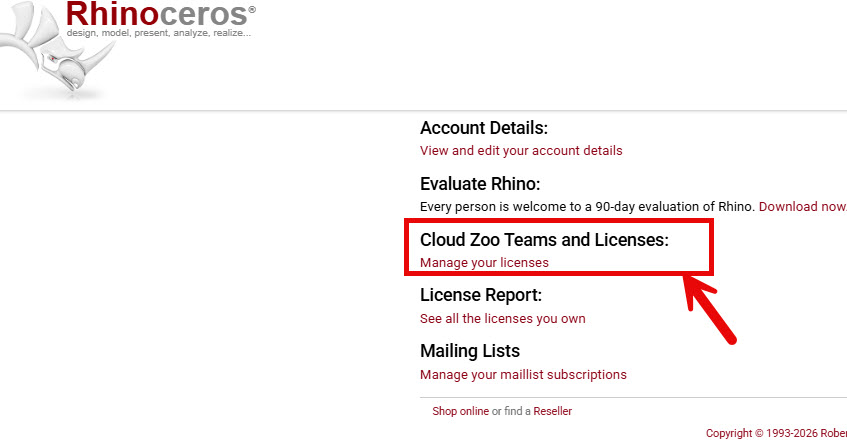
To see what users are using your licenses, pick Cloud Zoo Teams and Licenses

Usage Bar will show how many user have a license in use.
 With License chains of Rhino 6, 7, or 8, checking out one version will show usage for all the licenses in the chain. They are linked or chained together.
Get a report of your license usage:
- Go to your https://www.rhino3d.com/my-account/:
- CloudZoo Teams.
- Pick on your Team.
- And see the usage report on the screen.
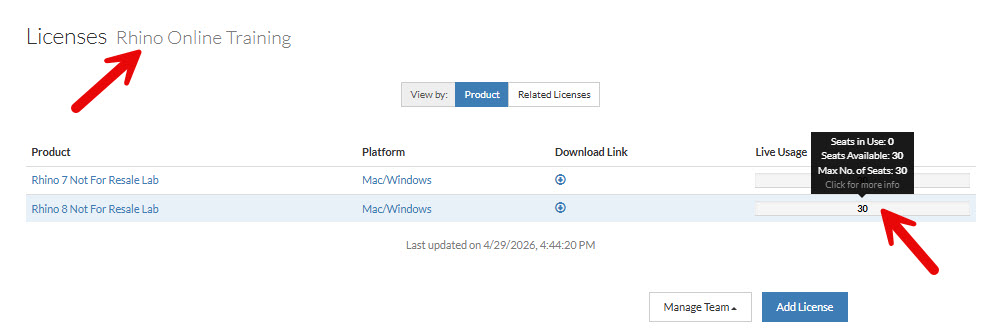


Only the Team owner and admins can see the Rhino usage. You will need to make a Team member an Admin if you want them to see this.
rhino_accounts/licenseusage.1781304878.txt.gz · Last modified: 2026/06/12 by maryfugier

